
Utilities
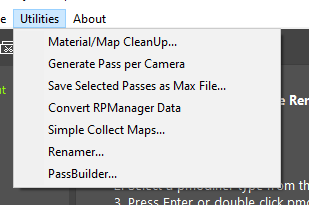
Nine tools under the Utilities menu, for the jobs around a pass setup rather than inside one - building passes in bulk, renaming, cleaning up and handing a scene off.
- rsPassBuilder - builds passes by mixing and matching the setups held in source pass groups. Commercial version only.
- rsPassGenFromCVS - generates passes and pmodifiers straight from a CSV file or the clipboard. Commercial version only.
- renderStacks Mini - a compact window for picking passes and previewing them, several at a time. Its Preview button carries the same right-click menu as the full-size one.
- rsRenamer - search and replace with regex and a preview, over pass, layer and file names as well as object names.
- Material/Map CleanUp - shows what is sitting in the material and map depot and removes it. Taking a material off a pmodifier deliberately leaves it in the depot, so they build up over time; anything worth keeping can go into Slate ME first.
- Generate Pass per Camera - a pass or passgroup for every camera, named after it, each with a matching Camera pmodifier. Prefix and suffix optional.
- Save Selected Passes as Max File - activates each selected pass and writes a max file per pass. Superseded by the Save pmodifier, which the page itself points you to.
- Simple Collect Maps - copies every asset Asset Tracker can see into a folder of your choosing and saves the max beside them. It does not repath anything - it is for zipping a scene up and sending it on.
- Remove OverScan Data - strips overscan data left behind on a camera, run from the Utilities menu against the cameras you have selected.