[vpS] ViewportSettings – 1 per pass, Preset
Applies a full set of 3ds Max viewport display settings when the pass is activated, so a pass can carry its own viewport look.
Options
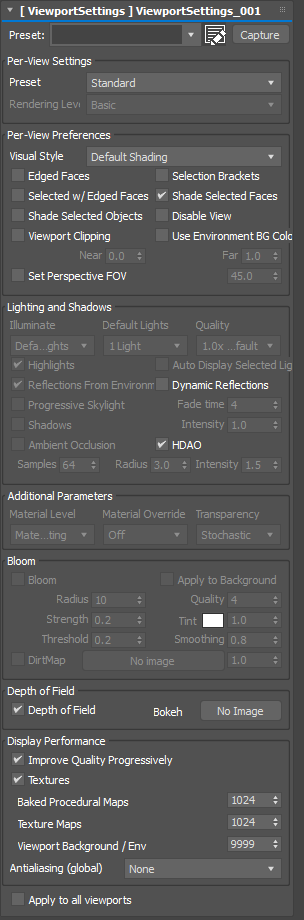
- Preset – a built-in viewport preset (High Quality, Standard, Performance, DX Mode) or User Defined. With a built-in preset selected the values are shown read-only, because 3ds Max applies the whole preset itself; choose User Defined to set every value.
- Capture – capture the current viewport’s settings into the modifier. A newly added modifier captures the active viewport automatically.
- Apply to all viewports – apply the settings to every viewport instead of only the active one.
- Per-View Settings / Per-View Preferences – the rendering level, visual style, and the per-view preferences including the perspective Field of View.
- Lighting and Shadows – illumination, default lights, shadows, Ambient Occlusion (and HDAO), and reflections from the environment.
- Additional Parameters – transparency mode, quality and viewport tint.
- Bloom – bloom and its dirt-map image.
- Depth of Field – viewport depth of field and its bokeh-shape image.
- Display Performance – textures, texture size limits, progressive refinement and antialiasing.
- Viewport Clipping – near and far clip planes.
Notes
- Antialiasing is a global 3ds Max setting, not per-viewport. A pass that sets it changes it for the whole session, and it is not restored when the pass ends.
- Perspective Field of View applies only to the active viewport and is meaningless on an orthographic view.
- Built-in presets own the whole Settings tab, so those values are read-only until you switch to User Defined.