
[Sv] Save – 1 per pass, Preset, Action
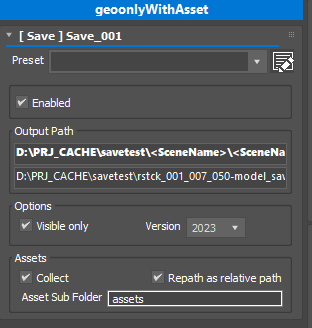 This pmodifier allows saving an activated pass as max file.
- Enabled
Enable/disable action. - Output Path
Set the saved file path. You can use renderStacks tokens just like Render Output. pmodifier.
* Path name must end with .max - Output Preview
The preview for the to be built path.
Rightclick menu is available.
The background turns orange and the tooltip shows the character count when the resolved path reaches the 255-character Windows path limit.

- Visible only
Only save visible objects. Same as select all visible object and Save Selected.
* Any dependent of visible object will also be saved even tho they are hidden. - Version
You can save as previous version. 3dsMax support up to 3 versions back for save. - Assets / Collect
Collect all assets of the file and copy to the save folder or its sub folder. Then, all assets are repath to the copied files. - Asset / Repath as relative path
If you check this option, absolute paths will be used. If you want to send the folder to somewhere else, you should turn on this option. - Asset Sub Folder
If it is empty all assets will be copied to the same folder where the max file is. If a folder name is entered, the same name sub folder will be made under max file path and used.
Asset Collection for multi file asset
Currently .ifl, .xml(PointCache per frame), <UDIM> files are supported.