I added a small Maxscript documentation about scripting renderStacks.
renderStacks 2.08 has been released.
- New – VRayFramebufferLayerTree pmodifier
- Improved – FrameRange – Move to first frame

- Improved – Deadline – USER-DEFINED NETWORKPATH support
- Improved – Deadline – Auto turn off script job
- Improved – Renderer/VRayFramebufferLayerTree support for load/save
- Improved – ObjSet editor will open as floating dialog
- Improved – Save – save to previous
- Improved – Save – pass searchbox

- Improved – Save all pass including passgroups
- Improved – Only object that has parent will show up in AlignLink available object list
- Improved – Changed the way to pick parent for AlignLink
- Fixed – Prevent opening rePrv when renderer changes
- Fixed – Renderer pmod will be properly duplicated/deinstanced
- Fixed – cleaned up Material/Map Cleanup utility.
- Fixed – Put Material/Maps in MaterialEditor for some pmodifiers were broken
- Fixed – LayerSet apply when the set name was empty when the editor is opened.
- Fixed – rename pmodifier with hotkey and right click
- Fixed – accumulative modifier ::base object check
It has been a while since the last update of renderStacks. Now renderStacks is supporting a nested pass setup with the pmodifier on passgroup and instanced passes. It took a lot longer than we expected. But, I hope this would add another dimension to your workflow!
A new tutorial and documentation
http://renderstacks.com/docs/
https://renderstacks.com/docs/
Also don’t forget the changelog
Happy renderStacking!
renderStacks 1.246 has been released.
It is a small update. But, all new features are from user request.
- Automatic layer localization for Scene Xref. Please read this page for details.
- Delete Passgroup Tree
Now you can delete passgroup(s) with all their passes.SHIFT+Del or SHIFT+Remove Node button or right click menu.

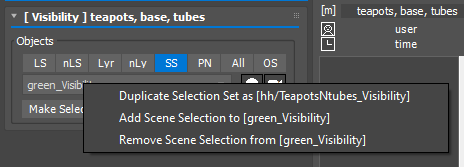
- Visibility Pmodifier Selection Set Rightclick menu. Click here for details.
If a Visibility pmodifier is using SS(Selection as selection method) and a selection set is assigned, you will have a right click menu like the following image.

- 1.239 caused renderStacks to crash while changing pmodifier name
renderStacks 1.243 has been released with 3dsMax 2022 support.
In the latest update to renderstacks, we were extremely excited to collaborate with the Blizzard Animation team at Blizzard Entertainment to develop the Tractor pmodifier that is now available for all renderStacks users.
Here is the list of new features. As always, all new features are driven by user request. For the detailed change log, please check the Change Log.
- Tractor (Pixar’s network rendering solution) support
- Now you can color pass(group) using right click menu or 1-9 short cut.

- Search obj/prop name in the pmodifier list.

- SHIFT support for multi selection for Layerset editor.
- Single level expand/collapse.
Holding SHIFT while expand/collapse limits the action for only one level. For example, if you have not expanded all pass groups, SHIFT+E will expand only groups and keep pmodifier collapsed. - A few more functions are added to the layerset editor right click menu

- Preference > Network Submission Temp .msx File
Now RoyalRender users can define their own temp .max file path for submission.
I’m sorry for the late announcement. renderStacks had been updated to 1.231 on 2/18/2021. It you have downloaded after 2/18,you probably already have 1.231. Also if you are have a commercial license, you already have gotten email. If you use NC version and are using older version, please download again.
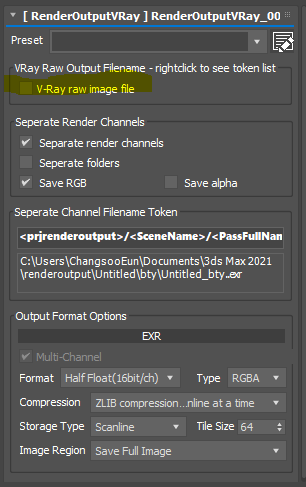
- RenderOutputVRay – file was not saved when “Separate Channels” option was used. It is fixed.
- Some user reported right click menu is not working. This is fixed.
Apparently a lot of users are confused about the new RenderOutputVRay in renderStacks 1.222. To prevent the confusion. We added explicit “V-Ray saw image file” checkbox so you can turn off V-Ray raw image file output when you don’t use multi channel exr.
Also the documentation has been updated for RenderOutputVRay. Please read the documentation!

Also there is another changes. Please check Change Log for details and other changes.
renderStacks 1.222 has been release with many user requested features, improvement and fixes include…
- RenderOutputVRay pmod
- rsUserPreSubmitFn
- Custom BackBurner IP/Name option in Preference
- Pass group will have prefix {g} in the treeview
- Sort Pass by alphabetically in right click menu
- Camera select button in Camera pmodifier
- Open in Built-In Image Viewer after multi preview
- Added add selection from SE for layer type in LightOn and Material
- rsRenamer – Right click menu for preview list
renderStacks has been updated to 1.108
This release is the productivity update. As our user based grows, we have received a lot of great feedback and ideas. We tried our best to address and implement what our users want.
New features includes…
- Layer based workflow for LightOn/Material pmodifier
- Toggle Note panel
- Treeview size adjustment
- Streamlined multi preview display
- RPManager converter
- rsRenamer
- Link to AnimationRange in FrameRange pmodifier
- and more!
Click here to see all the awesome new features and improved features.
renderStacks 1.06 has been released with 6 new pmodifiers. With Royal Render support, now renderStacks is supporting 3 network renderfarm management solution out of box.
- XRefSceneVisible pmodifier
-
LayerPropsRender pmodifier
-
LayerPropsDisplay pmodifier
-
CoronaRenderSelected pmodifier
-
CoronaOverrideMtl pmodifier
- Royal Render Pmodifier
Other new features are
Also a few bugs has been squashed. Please check the ChangeLog.