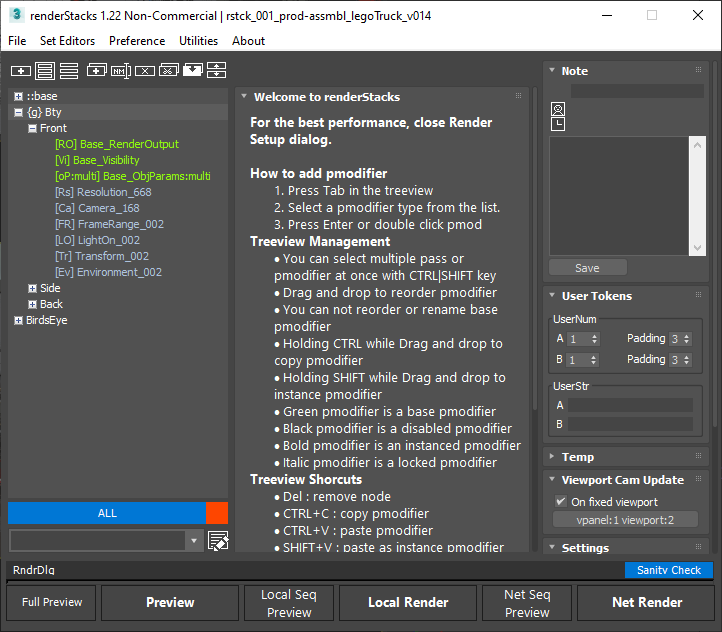
Control anything you want, and only what you need
The goal is to cut down the number of scene files you deal with, so a
pass has to reach a long way: camera, resolution, frame range, object
visibility, materials, object properties, renderer parameters, on and
on.
But you do not have to control all of it all the time. Want a
different threshold per pass? Then manage that one value, not every
renderer parameter. The granularity is yours to choose.
One place to control everything
A parameter palette for all your render and scene management needs.
You will not need to open the Render Setup dialog or Object
Properties - what you need is already at your fingertips.
Procedural and dynamic object selection
From traditional 3ds Max selection sets to renderStacks' own layer
sets, there are several ways to define a group of objects and use them
as one.
Need the same set of objects used as matte objects here, as a lighting
exclusion there, across several passes, and kept in sync? Object sets
make that easy and hard to get wrong.
Pipeline and team friendly
Central control, automatic pass setup, total control over output.
Pipeline hooks can override or block feature access from artists, and
we are open to adding as many controls as you need.
Every single feature is reachable from MaxScript, so passes can be
generated by script. Setup data saves and shares between users, and
selected passes can be merged between artists.
Tokens
No more typing output paths. Set a rule once with the built-in tokens
and save it in a startup file - and if you are a truly unique flower,
write your own token. You need never open the output dialog again.
Automatic, generic third-party support
No waiting for us to support the new option in your renderer or
plugin. As long as a feature is exposed to MaxScript, renderStacks
sees it and lets you use it.
Truly for artists. No scripting needed
Most 3ds Max artists we have met do not want to script - and if they
had to, they could have written this themselves. Everything is
reachable through the UI.
Not just for rendering
Trying combinations of fluid simulation settings? Make a pass per
variation instead of taking notes - the parameters travel with the
pass, and going back is one click.
Same for a Model pass and a Preview pass that turn every
TurboSmooth in the scene off and on. It is really a way to toggle
between parameter states.